Free Quote Generator
Create a professional, itemized price quote online and download it as a PDF. Line items, tax and totals calculate as you type. Free, no sign-up, no watermark — and nothing you enter leaves your browser.
Line items
Prepared for: —
Date: · Valid until:
| Description | Qty | Unit price | Amount |
|---|
Created with QuotApp — quotapp.com
How the quote generator works
- Enter your details and the client's. Business name, contact line, client name, quote number (Q-2026-001 style) and validity in days.
- Add line items. Description, quantity, unit price — as many rows as the job needs. Subtotals update live.
- Set tax, discount and terms. Tax percentage, optional discount, payment terms and notes.
- Download the PDF. One click; the print dialog shows only the finished quote. Save it and send it.
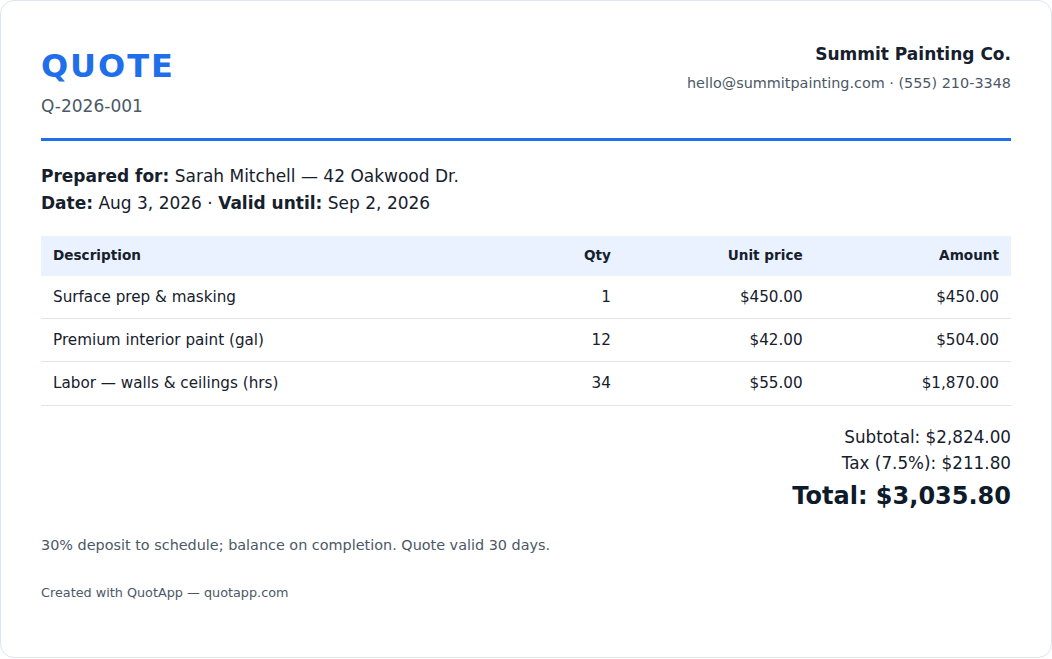
What a professional quote includes
The generator lays the document out in the order clients read it: who it is from, who it is for, the quote number and dates, the itemized lines with quantities and unit prices, subtotal, discount, tax and total, then your terms and a validity date. That structure is the same one in our quote templates and in the standard quotation format. If you send more than a handful of quotes a month in one trade, start from an industry template instead — painting, cleaning, HVAC, landscaping and plumbing come with filled-out examples and typical US prices.
Quote generator vs quote template vs quoting software
| Use | Best for | Trade-off |
|---|---|---|
| This quote generator | A finished PDF in a minute, occasional quotes, no account | No saved history or logo yet |
| Quote templates (Word, Excel, Docs) | Your own branding, a reusable master file, industry line items | Manual math in Word; you manage the files |
| Quoting software | Dozens of quotes a month, tracking, e-signature, quote-to-invoice | Monthly fee and setup; see the free options |
Pricing the quote before you generate it
The generator does the arithmetic on the document; it does not tell you what to charge. Three free calculators do: the hourly rate calculator sets your billable rate from your costs and target income, the labor cost calculator gives your true cost per employee hour, and the markup calculator converts the margin you want into the markup to apply to materials.
Frequently asked questions
What is a quote generator?
A quote generator is a free online tool that turns your prices into a professional, itemized price quote a client can accept. You enter your business details, the client, line items with quantities and unit prices, and a tax rate; the generator formats the document, calculates subtotals, tax and total, and exports a PDF. This one is for business price quotes (also called quotations), not for quote images or inspirational sayings.
Is the QuotApp quote generator really free?
Yes — free, no sign-up, no watermark, no limit on the number of quotes. Nothing you type is uploaded; the document is built in your browser.
How do I download the quote as a PDF?
Click "Download PDF". Your browser's print dialog opens with only the finished quote visible — choose "Save as PDF" as the destination. On a phone, use the share sheet and pick "Save to Files" or "Print → PDF".
Can I add my logo?
The generator prints your business name and contact details in the header. For a logo, download the matching Word or Excel quote template, add your logo once, and reuse it — or wait for QuotApp accounts, which will save your branding.
Can I add tax, discounts and multiple line items?
Yes. Add as many line items as you need with quantity and unit price; set a tax percentage and an optional discount; totals update as you type.
Quote generator or quote template — which should I use?
Use the generator when you want a finished PDF in a minute and do not need to store the file. Use a template (Word, Excel, Google Docs) when you want your own branding, a saved master file, or industry-specific line items. Both produce the same document structure.
Can I make an estimate instead of a quote?
Yes. Switch the document type to "Estimate" — the heading, the numbering prefix and the disclaimer change. There is also a dedicated free estimate generator.
Is my data stored anywhere?
No. Everything stays in your browser tab. Close the tab and it is gone, which is also why you should download the PDF before leaving.
Need an estimate rather than a fixed quote? Use the free estimate generator, or read when to send a quote vs an estimate.